Quick Facts
- Release Date: The rollout begins in March 2026, integrated directly into Samsung's Tizen-based AI TVs.
- Platform Exclusivity: Samsung holds a six-month exclusive window for the "Memories" feature, starting from the launch date.
- Core Technology: Integration leverages Google’s Nano Banana generative AI model and Samsung’s Vision AI Companion (VAC).
- Key Features: AI-driven "Remix" tools, photo-to-video animation, and curated "Memories" slideshows.
- Setup: Requires a compatible 2026 Samsung AI TV and a standard Google Account login via the Daily+ interface.
For years, the smart TV industry has faced a curious paradox. While our smartphones have become sophisticated vaults for our most precious life moments, the largest screen in our homes—the television—has largely remained a passive display. Surprisingly, even Google’s own TV platform has lacked a deeply integrated, native Google Photos experience that feels intuitive rather than clunky.
But all that is about to change. Samsung and Google have confirmed a landmark partnership to bring Google Photos to Samsung AI TVs starting in March 2026. This isn't merely a port of a mobile app; it is a fundamental reimagining of how digital memories occupy physical space. By combining Google’s generative AI prowess with Samsung’s dominant display ecosystem, your living room is about to become a dynamic, AI-curated gallery.
The Big Screen Debut: Why This Matters
The arrival of Google Photos on Samsung’s Tizen OS is a strategic masterstroke for both companies. For Samsung, it solidifies their lead in the "AI TV" category. For Google, it provides a massive, high-quality canvas for their latest AI models.
When will Google Photos be available on Samsung TVs? The official rollout is scheduled for March 2026. What makes this particularly noteworthy is the competitive landscape: Samsung will enjoy a six-month exclusive window for the Google Photos "Memories" feature. During this half-year period, Samsung will be the only television manufacturer globally to offer this specific, AI-enhanced photo experience, leaving competitors like Sony and LG in the rearview mirror until late 2026.
This integration isn't just about viewing static images. It represents a three-phase evolution of the "Ambient Home," where the TV serves as a central hub for personal storytelling. By syncing with Samsung’s Daily+ and Daily Board, your photos won't just sit in a folder; they will intelligently surface based on your habits, the time of day, and even the people present in the room.
Phase 1: Reliving Memories in March 2026
The first phase of the rollout focuses on emotional resonance through the "Memories" feature. Unlike traditional slideshows that cycle through images chronologically, the 2026 integration uses Samsung’s Vision AI Companion (VAC) to understand the context of your library.
The VAC works in tandem with Google’s cloud data to identify themes—such as "Summer in Tuscany" or "The Kids’ First Steps"—and presents them in a cinematic format specifically optimized for 4K and 8K displays. This phase aims to turn the TV into a "digital window" when not in use, utilizing the Daily Board to show curated highlights that change throughout the day.
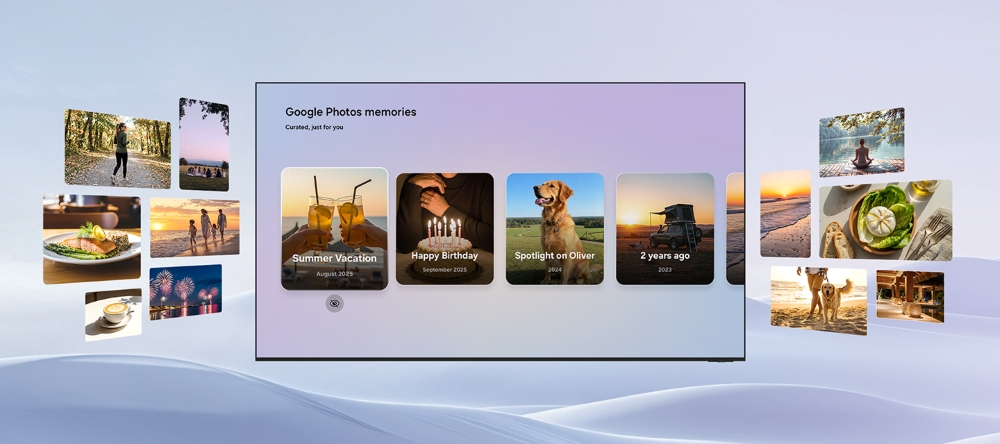
This level of integration solves the "forgotten photo" problem. Most travelers return from a trip with hundreds of photos that are never seen again once the initial social media post is made. The Samsung AI TV aims to resurrect these moments, placing them in high-definition rotation without any manual effort from the user.
Phase 2: Generative AI and the 'Nano Banana' Power
By mid-to-late 2026, the partnership will move into its most ambitious phase: generative editing. This is powered by Google’s Nano Banana, a lightweight but remarkably efficient AI model designed to run on localized hardware. This allows the TV’s NPU (Neural Processing Unit) to handle complex image manipulations without significant lag.
Three specific features stand out in this second phase:
- The ‘Remix’ Feature: This allows you to change the artistic style of your photos on the fly. Want your backyard sunset to look like a Van Gogh painting or a futuristic neon cityscape? The Remix tool uses generative AI to re-render your images into high-resolution digital art.
- Photo to Video: Perhaps the most impressive technical feat, this feature uses AI to infer movement in still images. It can animate water in a landscape shot or create a slow-motion "parallax" effect on a portrait, turning a static image into a 10-second cinematic clip.
- Personalized Slideshows via Vision AI: You can prompt the TV to "Show me my best hiking photos from the last five years," and the Vision AI will cross-reference location data, visual markers (like backpacks or trails), and image quality to build a custom presentation instantly.
Comparing the Rollout: Phase 1 vs. Phase 2
To help manage expectations, here is a breakdown of how the features will evolve through 2026:
| Feature Category | Phase 1 (March 2026) | Phase 2 (Late 2026) |
|---|---|---|
| Primary Focus | Consumption & Ambient Viewing | Creation & Generative Editing |
| Core AI Tool | Vision AI Companion (VAC) | Google Nano Banana GenAI |
| User Interaction | Passive (Daily Board/Daily+) | Active (Remixing & Search) |
| Key Capability | Smart 'Memories' Curation | Still-to-Video Animation |
| Exclusivity | 6-Month Samsung Exclusive Window | Full AI Feature Set Activation |
How to Set Up Google Photos on Your Samsung TV
Samsung has streamlined the onboarding process to ensure it remains accessible to non-technical users. The setup is designed to be a "one-and-done" procedure that integrates into the initial TV boot-up or via the Daily+ dashboard.
How do I set up Google Photos on my Samsung TV? Follow these three steps:
- Launch Daily+: On your 2026 Samsung AI TV remote, navigate to the Daily+ section or the Daily Board settings.
- Sign In: Select the Google Photos icon and scan the QR code with your smartphone. This will prompt you to log into your Google Account.
- Sync & Permission: Grant permission for the Samsung Vision AI Companion to access your Google Photos library. You can then select specific albums or allow the "AI Memories" feature to automatically curate your best shots.
It is important to note that these features require the enhanced processing power found in the 2026 Samsung AI TV lineup. While some basic viewing features might trickle down to older models via Tizen updates, the generative "Remix" and "Nano Banana" tools will likely be hardware-dependent due to the NPU requirements.
The Roadmap: A 3-Phase Integration Process
The collaboration between Seoul and Mountain View isn't a one-off update; it’s a long-term roadmap designed to redefine the smart home ecosystem.
- Phase 1 (March 2026): The "Memories" launch. The focus here is on establishing the Samsung TV as the premier display for the Google Photos ecosystem, leveraging the six-month exclusivity window to drive hardware sales.
- Phase 2 (Late 2026): The introduction of Generative AI editing and personalized search tools. This is where the TV shifts from a display to a creative tool.
- Phase 3 (2027 and Beyond): Full ecosystem integration. Expectations include the ability to sync TV-edited photos back to your mobile device and potential integration with other Google Workspace tools for collaborative photo sharing on the big screen.
As a travel critic, I often look for ways to bring the "destination" back home. For years, digital frames were too small, and casting from a phone was too tedious. The Samsung and Google partnership finally offers a solution that matches the scale of our experiences. It’s an authoritative step forward in making technology feel less like a tool and more like a part of our home’s DNA.
FAQ
Q: Will I need a subscription to use Google Photos on my Samsung TV? A: No additional subscription is required beyond your existing Google Photos storage plan. The "Memories" and "AI Remix" features are included as part of the 2026 Samsung AI TV software suite.
Q: Does the "Remix" feature change my original photo forever? A: No. The AI-generated "Remixes" and videos are created as new versions. Your original high-resolution photos in the Google Photos cloud remain untouched.
Q: Is my privacy protected if the TV is analyzing my photos? A: Samsung and Google have stated that the Vision AI Companion processes much of the curation locally on the TV's NPU to enhance privacy. However, a connection to Google’s servers is required for cloud-based generative tasks and syncing.
Ready to transform your living room into a world-class gallery? Keep an eye on the 2026 Samsung AI TV announcements.