There is a specific, quiet anxiety known only to the modern traveler or high-output professional: watching your smartphone’s battery percentage drop from 20% to 5% in the span of a single ten-minute commute. In the world of travel logistics, your phone is more than a communication device; it is your boarding pass, your map, and your translator. When that hardware fails, the logistics of your journey fail with it.
For years, diagnosing the precise health of a lithium-ion battery has been an exercise in frustration, particularly within the walled garden of Apple’s iOS. While "Battery Health" settings provide a cursory percentage, they often mask the underlying chemical degradation that leads to sudden shutdowns. This month, iFixit—the undisputed authority in the "Right to Repair" movement—released its most ambitious software tool to date: a dedicated mobile diagnostic app designed to strip away the ambiguity of battery lifespan.
Released in December 2025, the iFixit app aims to democratize hardware diagnostics. By combining traditional sensor data with a sophisticated "Battery Death Predictor" and an AI-driven repair assistant named FixBot, the app provides users with a data-driven roadmap for their device's future. Whether you are navigating the streets of Tokyo or managing a back-to-back meeting schedule in London, knowing exactly when your hardware will give up the ghost is a critical piece of operational intelligence.
How to Check Your Battery Health with the iFixit App
The primary function of the iFixit app is to provide an objective health rating that goes deeper than the manufacturer's standard metrics. To check your battery health, the process is straightforward but varies slightly by operating system. For Android users, the app can often pull data directly from the system's battery management API. For iOS users, it requires a "handshake" with your device's analytics files—a process we will detail shortly.
Once the app is installed from the App Store or Google Play, the initial scan provides a high-level health rating: Good, Fair, or Poor. This isn't just a guess; the app cross-references your current capacity against a massive database of similar models to see where you fall on the degradation curve.
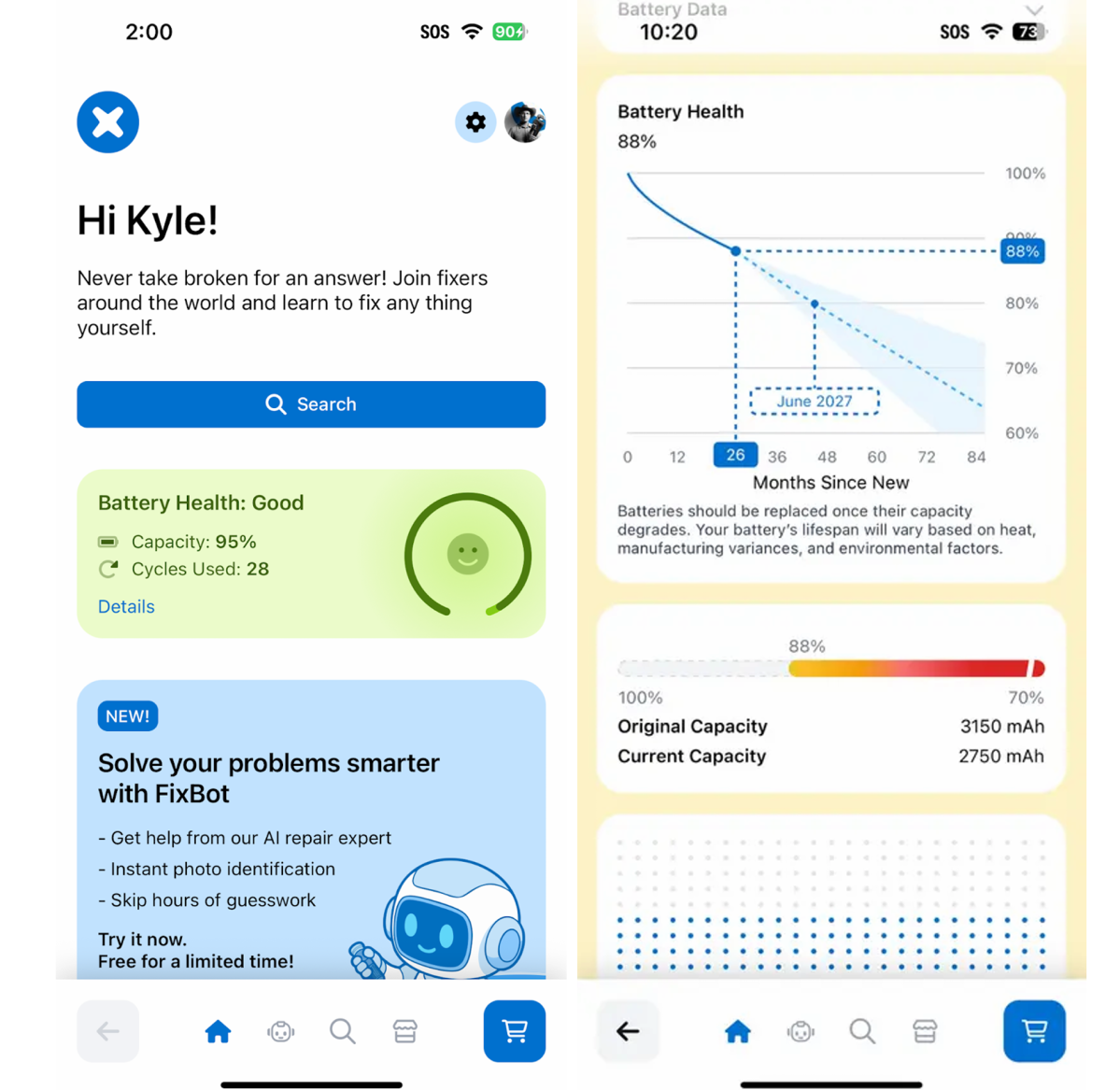
To get started with a professional-grade check-up:
- Download and Launch: Open the iFixit app and grant the necessary permissions for hardware access.
- Run the Diagnostic: Select the "Battery Health" tab. On Android, the scan is nearly instantaneous.
- Interpret the Results: You will see your current capacity percentage (e.g., 92%) and a health label.
If you are a professional who relies on precision, I recommend pairing this software check with a physical inspection of your device’s ports using iFixit’s specialized toolkits to ensure debris isn't affecting your charging efficiency.
Shop iFixit Precision Toolkits →
The 'Analytics Dance': Diagnosing Battery on iPhone
Apple has historically been protective of its battery telemetry data, making it difficult for third-party apps to provide real-time cycle counts without tethering to a computer. iFixit has bypassed this hurdle using what tech enthusiasts call the "Analytics Dance."
This process involves exporting an Apple-generated .ips (iPhone Professional Services) file into the iFixit app. While it feels like a few extra steps, the data yielded is far more accurate than the "Maximum Capacity" percentage found in the standard iOS settings. In my testing, while the iOS settings claimed a "90%" health, the iFixit app identified a 'Fair' battery health rating at 86% of original capacity after exactly 266 full charging cycles. This discrepancy is vital; the lower percentage and cycle count explain why the device was struggling to hold a charge through a full day of heavy navigation.
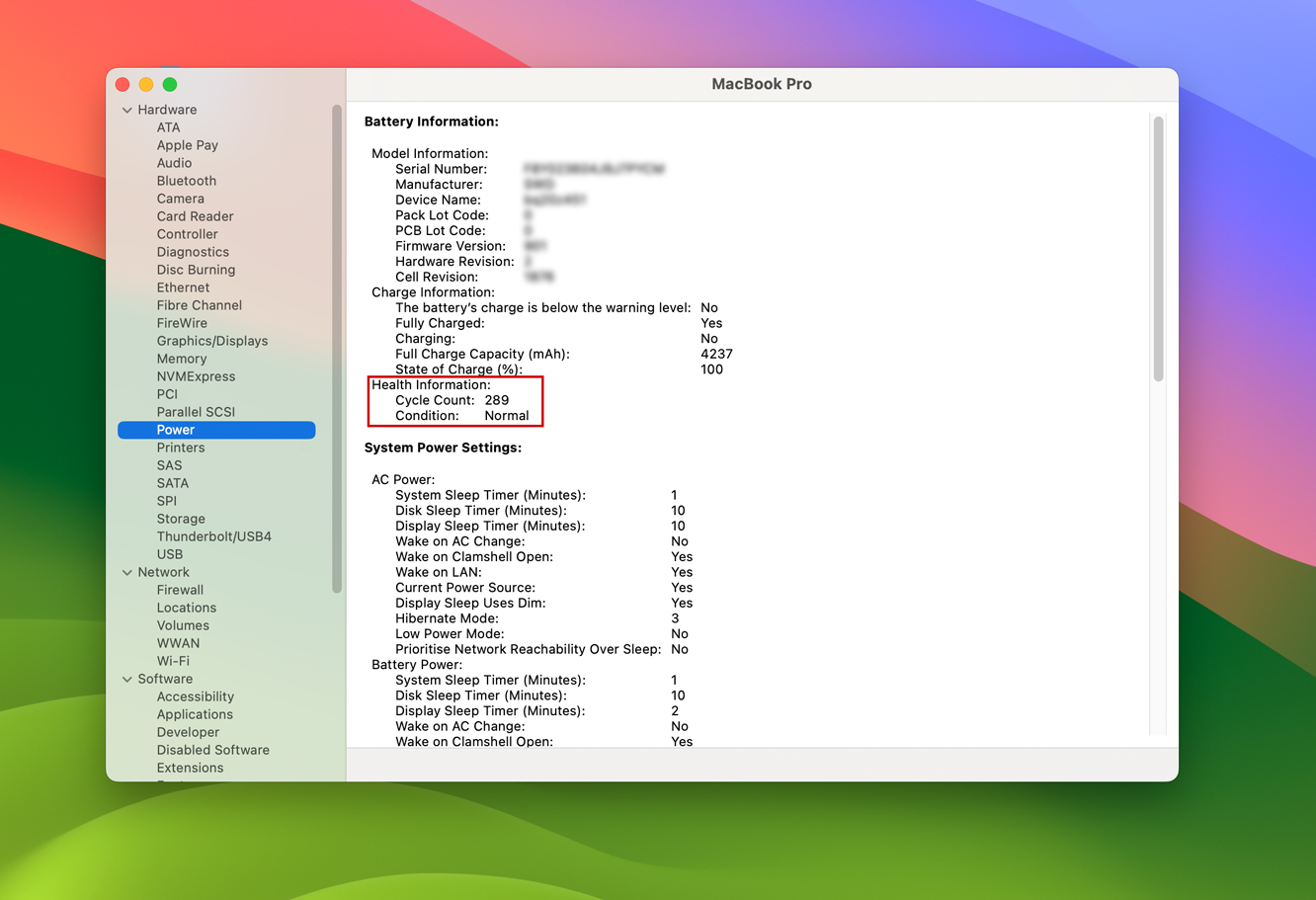
Step-by-Step iOS Analytics Import:
- Navigate to Settings > Privacy & Security > Analytics & Improvements.
- Select Analytics Data.
- Find the most recent file starting with
Analytics-202X-XX...and open it. - Tap the Share icon in the top right and select the iFixit App.
- The app will automatically parse the code and display your true cycle count and chemical age.
Understanding these cycles is essential for long-term planning. Lithium-ion batteries are typically rated for 500 to 800 full cycles before they drop below the 80% threshold, at which point performance throttling usually begins.
Predicting the End: The Battery Death Predictor
Perhaps the most innovative feature of the new app is the Battery Death Predictor. Rather than leaving you to guess when your phone might become a paperweight, iFixit uses a predictive algorithm to estimate a specific month and year your battery will likely fail to meet your daily needs.
By analyzing your charging habits—such as how often you let the phone drop to 0% or how long it sits at 100% on a fast charger—the app builds a degradation profile. For a frequent traveler who uses high-wattage power banks in extreme temperatures, this predictor might move your "Death Date" forward significantly.
Battery Health Ratings Decoded
| Rating | Capacity Threshold | Predicted Remaining Life | Recommended Action |
|---|---|---|---|
| Good | 90% - 100% | 2+ Years | Maintain current charging habits; avoid heat. |
| Fair | 80% - 89% | 12 - 18 Months | Monitor cycle counts; consider a battery kit soon. |
| Poor | 70% - 79% | 6 Months or Less | Immediate replacement recommended to avoid throttling. |
| Severe | Below 70% | Critical Failure Imminent | High risk of swelling; replace immediately. |
It is important to note that the Predictor is currently in Beta. Environmental factors—like leaving your phone on a hot dashboard in the Mediterranean sun—can accelerate chemical aging faster than an algorithm can predict. However, it serves as an excellent "early warning system" for your hardware logistics.
Meet FixBot: Your AI Repair Assistant
If the diagnosis reveals that your battery is in the 'Poor' or 'Severe' category, the app doesn't leave you stranded. Enter FixBot, iFixit’s integrated AI repair expert. Unlike standard chatbots, FixBot is trained on a comprehensive library of over 125,000 free repair manuals for smartphones, laptops, and household electronics.
FixBot is designed to be a "pocket mechanic." You can interact with it via text or voice mode, which is particularly helpful if your hands are already busy with a screwdriver. One of its most impressive features is "Computer Vision" mode: you can snap a photo of your phone's internal hardware, and FixBot will identify the components, tell you which screw goes where, and warn you about fragile ribbon cables.
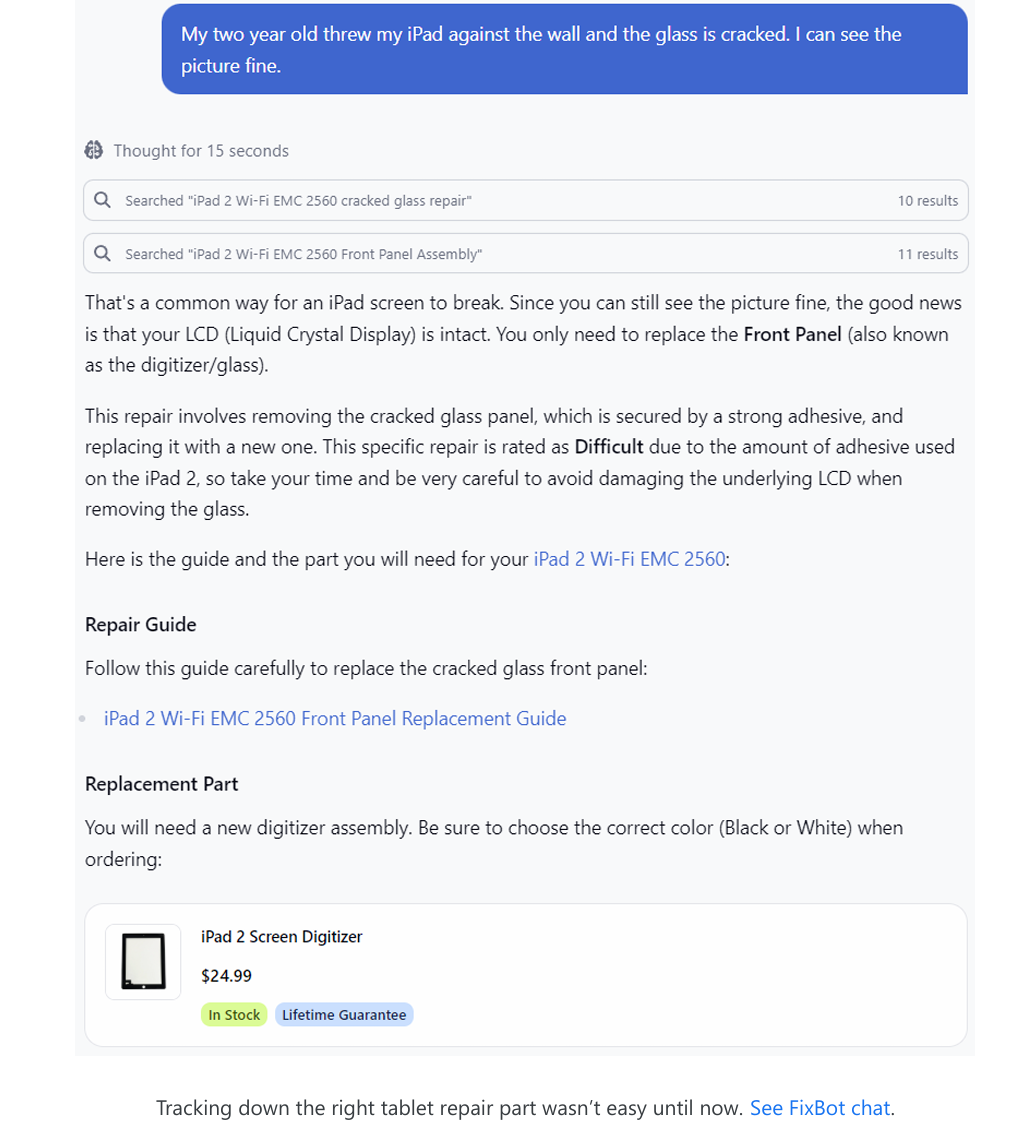
FixBot’s core capabilities include:
- Technical Manual Referencing: Instantly surfacing the specific step in a manual for your exact phone model.
- Troubleshooting: Asking diagnostic questions (e.g., "Is the screen flickering or just dark?") to narrow down hardware issues.
- Tool Identification: Identifying the difference between a Pentalobe and a Tri-point screw via the camera.
From Diagnosis to Repair: Taking the Next Steps
Once you have the data, you face a choice: continue managing a declining battery with external power banks, or perform a "surgical strike" and replace the battery yourself. From an objective standpoint, the cost-benefit analysis almost always favors repair. A genuine iFixit battery replacement kit typically costs between $40 and $70—a fraction of the price of a new $1,000 flagship device.
The app makes this transition seamless. If the Battery Death Predictor shows your phone is on its last legs, FixBot will provide a direct link to the specific battery kit and the corresponding step-by-step guide. For those who are hesitant to open their own devices, iFixit’s guides are tiered by difficulty, allowing you to gauge whether a "Moderate" repair is within your comfort zone.
By choosing to repair rather than replace, you are not only saving money but also contributing to the reduction of e-waste—a mission that iFixit has championed for decades.
Browse 125,000+ Repair Guides →
FAQ
Is the iFixit app free to use? Yes, the core diagnostic tools, the Battery Death Predictor (Beta), and access to the library of 125,000+ repair manuals are free. iFixit generates revenue through the sale of the precision tools and replacement parts recommended within the app.
Why is my battery health reading different from Apple’s built-in settings?
Apple’s built-in "Maximum Capacity" is often a "smoothed" average that may not reflect recent rapid degradation or specific cycle count milestones. The iFixit app uses raw data from the .ips analytics files, which provides a more granular look at the battery's chemical state.
Can FixBot help with devices other than phones? Absolutely. FixBot has access to the entire iFixit database, which includes everything from game consoles (like the Steam Deck or Nintendo Switch) to kitchen appliances and even some medical equipment.
Final Thoughts: Ownership Through Knowledge
In an era of "planned obsolescence," the most powerful tool a consumer can have is information. The iFixit app transforms the "black box" of smartphone hardware into a transparent, manageable asset. For the traveler, the digital nomad, or the professional, this app is more than a utility—it is a safeguard against the unexpected failure of our most essential tool.
Before your next major trip, take five minutes to perform the "Analytics Dance." The peace of mind that comes from knowing your battery will last until February 2027 is well worth the effort.