You have likely experienced the sensation: standing in a bright electronics showroom, mesmerized by a 65-inch screen displaying a lush rainforest or a high-octane action sequence. The clarity is staggering. You bring that same TV home, fire up your favorite Netflix show or a classic movie, and something feels... different. It is sharp, certainly, but it lacks that "looking through a window" reality you saw in the store.
This discrepancy highlights the central tension in modern home cinema: the difference between a display’s resolution and the content’s resolution. While your television may have a 4K panel, it is rarely showing "Native 4K" content. Instead, it is often performing a complex mathematical feat known as upscaling. Native 4K resolution features 8,294,400 original pixels, providing the highest level of detail, whereas upscaled 4K takes a lower-resolution source (like 1080p) and uses software to fill the 4K pixel grid.
To understand whether your Ultra HD TV is actually delivering on its promise, we must look past the marketing stickers and into the processor's "brain."
What is Native 4K? The Gold Standard of Clarity
In the world of display technology, "Native" is the term for a 1:1 relationship between the data in the video file and the physical pixels on your screen. A Native 4K image adheres to the Ultra HD (UHD) standard of 3840 x 2160 pixels. This is the absolute gold standard for home viewing because it involves zero guesswork.
When you watch native 4K content, every one of those 8.3 million pixels is instructed exactly what color and brightness to display by the original source file. This allows for microscopic levels of detail—the individual pores on an actor's face, the distant leaves on a mountain range, or the fine grain of a film’s texture—to remain perfectly intact.
True native 4K is less common than you might think. To experience it, you generally need:
- UHD Blu-ray Discs: These offer the highest bitrates and uncompressed detail.
- Premium Streaming Tiers: Netflix, Disney+, and Apple TV+ offer 4K, though bitrates are lower than physical media.
- Next-Gen Gaming: The PS5 and Xbox Series X are capable of native 4K, though many games use "dynamic resolution" to maintain frame rates.
What is Upscaling? The Science of Interpolation
Most of what we watch—from cable news to standard YouTube videos and even many "HD" streaming titles—is delivered in 1080p (Full HD). A 1080p image contains roughly 2,073,600 pixels. If you were to display a 1080p image on a 4K screen without any processing, the image would only take up one-quarter of the display, surrounded by a massive black border.
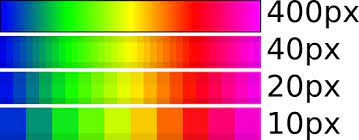
To fill the screen, the TV must "stretch" the image. This is where upscaling comes in. Because the TV cannot magically create new data that wasn't captured by the camera, it uses a process called interpolation. The TV's internal processor looks at the existing 2 million pixels and "guesses" what the surrounding 6.2 million missing pixels should look like based on neighboring data.
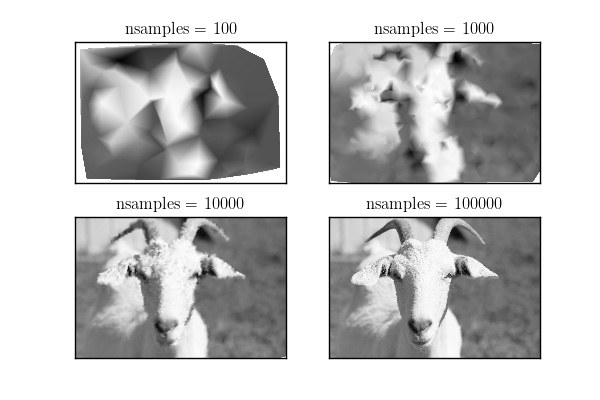
The mathematical challenge here is significant. When moving from 1080p to 4K, the processor must generate four pixels for every one original pixel. The data gap for 8K is even more staggering: an 8K display requires 33,177,600 pixels, meaning a 1080p source must be interpolated by a factor of 16 to fit the screen. This is why even the most expensive 8K TVs struggle to make standard cable TV look "sharp."
Is Upscaled 4K as Good as Native?
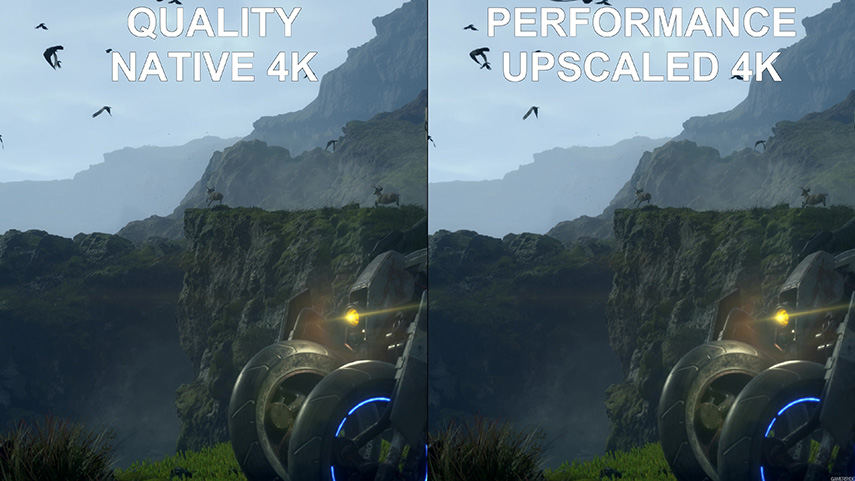
The short answer is no, but the gap is closing. To use a photography analogy, Native 4K is like an optical zoom, where you are physically moving the lens to capture more detail. Upscaling is like a digital zoom, where you are enlarging an existing image and trying to smooth out the jagged edges.
While upscaling makes lower-resolution content look cleaner and prevents the "screen door effect" (where you can see the individual pixels on a large display), it cannot add new visual information. If the original 1080p shot didn't capture the fine text on a distant sign, an upscaler cannot recreate that text; it can only make the blur look slightly more intentional.
Native vs. Upscaled: A Comparison
| Feature | Native 4K | Upscaled 4K (from 1080p) |
|---|---|---|
| Pixel Source | Original content data | Artificially generated by processor |
| Pixel Count | 8.3 Million (1:1 Match) | 2.1M Original + 6.2M Interpolated |
| Edge Definition | Pin-sharp and natural | Can appear slightly "soft" or "haloed" |
| Micro-Detail | High (skin pores, fabric textures) | Medium (smoothed out by noise reduction) |
| Hardware Dependency | Source player & HDMI 2.0+ | TV’s Internal Processor |
The Rise of AI Upscaling: Beyond Simple Guesswork
In recent years, the industry has shifted from "Linear Interpolation" to "AI-based Upscaling." Traditional upscaling simply averaged the colors of nearby pixels to fill the gaps. Modern flagship TVs from brands like Sony, LG, and Samsung use deep-learning algorithms.
These processors have been trained on databases of millions of images. When the AI sees a low-resolution edge of a building, it recognizes the pattern as "architecture" and applies a specific set of sharpening rules to that area. It can differentiate between the texture of a flower petal and the texture of a marble floor, applying different reconstruction techniques to each.
This AI reconstruction is particularly impressive in high-end PC gaming (via NVIDIA's DLSS technology) and premium 4K TVs. While it still isn't "native" detail, it creates a much more convincing illusion of sharpness by intelligently reducing "ringing" (white lines around dark objects) and "mosquito noise" (graininess in fast-moving scenes).

Viewing Distance: The Limit of the Human Eye
One of the most sobering facts in home cinema is that for many viewers, the debate between native and upscaled 4K is academic. The human eye has a limited "resolving power." Depending on how far away you sit, your brain may not be able to distinguish between 1080p and 4K, let alone native versus upscaled.
If you sit 10 feet away from a 55-inch TV, your retinas are physically incapable of seeing the 8.3 million individual pixels. At that distance, a high-quality upscaled 1080p image will look virtually identical to a native 4K image.
Optimal Viewing Distances for 4K Detail
| Screen Size | Distance to See 4K Benefit | Distance Where 4K Becomes "Necessary" |
|---|---|---|
| 55 Inches | 7.0 feet (2.1m) | 4.5 feet (1.4m) |
| 65 Inches | 8.2 feet (2.5m) | 5.3 feet (1.6m) |
| 75 Inches | 9.5 feet (2.9m) | 6.1 feet (1.8m) |
| 85 Inches | 10.8 feet (3.3m) | 7.0 feet (2.1m) |
Critic's Tip: If you are sitting further than 10 feet from your TV, don't obsess over "Native 4K." Focus instead on HDR (High Dynamic Range) and Color Accuracy, which are much more visible at a distance than raw pixel count.
Practical Tips for the Sharpest Picture
If you want to ensure your 4K TV is actually delivering the sharpest possible image, you need to look at your entire hardware chain. A $3,000 TV cannot fix a poor-quality signal.
- Prioritize Bitrate over Resolution: A 1080p Blu-ray often looks better than a highly compressed 4K stream from a low-end service. This is because the Blu-ray has more "data per second," leading to fewer artifacts for the upscaler to deal with.
- Use High-Speed HDMI Cables: Ensure you are using HDMI 2.0 or HDMI 2.1 cables. Older cables may limit your signal to 4K at 30Hz or even 1080p, forcing your TV to upscale everything.
- Check Your Streaming Settings: Most services default to "Auto" quality. If your internet bandwidth dips, they will drop you to 1080p or 720p without warning, leaving your TV to do the heavy lifting of upscaling a low-quality signal.
- Invest in a Good External Streamer: Devices like the Apple TV 4K or Nvidia Shield Pro often have superior upscaling chips compared to the "smart" software built into mid-range TVs.
Check Your TV's Upscaling Performance →
FAQ
Is the PS5 4K native or upscaled? It depends on the game. "Performance Mode" often renders games at 1440p (which is then upscaled to 4K) to ensure 60 frames per second. "Fidelity Mode" often targets native 4K at 30 frames per second.
Is upscaled 4K better than native 1080p? Yes. Even though upscaling doesn't add new detail, it uses the 4K panel's density to smooth out edges and eliminate the visible pixel grid. An upscaled 1080p image on a 4K TV looks significantly better than that same 1080p image on a native 1080p TV of the same size.
Can software make a 1080p video 'True 4K'? Technically, no. Software can reconstruct and sharpen an image to look like 4K, but it cannot retrieve the light and detail that was never recorded by the camera sensor during filming.
Conclusion
The "4K" label on your TV box refers to the hardware's capacity, not the content's reality. While Native 4K remains the undisputed king of home media, providing a level of detail that upscaling can only mimic, we are living in a golden age of processing.
For the average viewer sitting eight feet away from their screen, a flagship TV’s AI upscaler does such a remarkable job of filling those 6.2 million missing pixels that the difference is often negligible. However, if you are a cinephile seeking the absolute limits of your hardware, there is still no substitute for native 4K source material. Stop relying on your processor's "best guess" and feed it the data it was built to handle.